

More than 9.7 million sellers have registered on Amazon, making it a global hub for online commerce. For anyone considering selling, understanding how to use Seller Central can shape the future of your business. The right approach helps merchants organize, track, and grow, while missteps can lead to lost sales and account issues. This guide breaks down what you need to know so you can navigate the platform confidently and build a profitable Amazon presence.
Table of Contents
- Seller Central Defined And Core Functions
- Account Types And Eligibility Requirements
- Navigating Seller Central Key Features
- Seller Fees, Costs, And Financial Implications
- Common Challenges And How To Avoid Them
Key Takeaways
| Point | Details |
|---|---|
| Seller Central Functionality | Amazon Seller Central is a comprehensive platform that enables sellers to manage product listings, inventory, orders, and customer interactions efficiently. |
| Account Types | Sellers can choose between Individual and Professional accounts, with the latter offering more advanced tools and benefits for high-volume sellers. |
| Fee Structure Awareness | Understanding Amazon’s fee structure, including subscription and referral fees, is crucial for maintaining profitability in your selling strategy. |
| Performance Management | Continuous monitoring of account health and customer feedback is essential to avoid account suspensions and ensure long-term success on the platform. |
Seller Central Defined and Core Functions
Amazon Seller Central is the comprehensive web platform that transforms how third-party sellers manage their online business. Seller Central serves as the central command hub where merchants can list products, track sales, process orders, and interact with customers across Amazon’s massive marketplace. According to Amazon’s official documentation, this interface provides sellers with essential tools to efficiently operate their digital storefront.
The core functions of Seller Central span several critical business management areas:
- Product Listing Management: Enabling sellers to create, edit, and optimize product listings
- Inventory Tracking: Real-time monitoring of stock levels and automated restocking alerts
- Order Processing: Streamlined workflows for shipping, tracking, and customer communication
- Performance Analytics: Detailed sales reports, metrics tracking, and seller performance insights
At its heart, Seller Central bridges the gap between individual sellers and Amazon’s extensive customer network. Sellers gain access to powerful infrastructure that handles complex e-commerce operations, from payment processing to customer service management. This platform democratizes online selling by providing small and large merchants alike with professional-grade tools previously accessible only to major retailers.
Navigating Seller Central requires understanding its diverse features and maintaining consistent performance metrics. Success depends on mastering inventory management, responding quickly to customer inquiries, and strategically optimizing product listings to improve visibility and sales potential.
Account Types and Eligibility Requirements
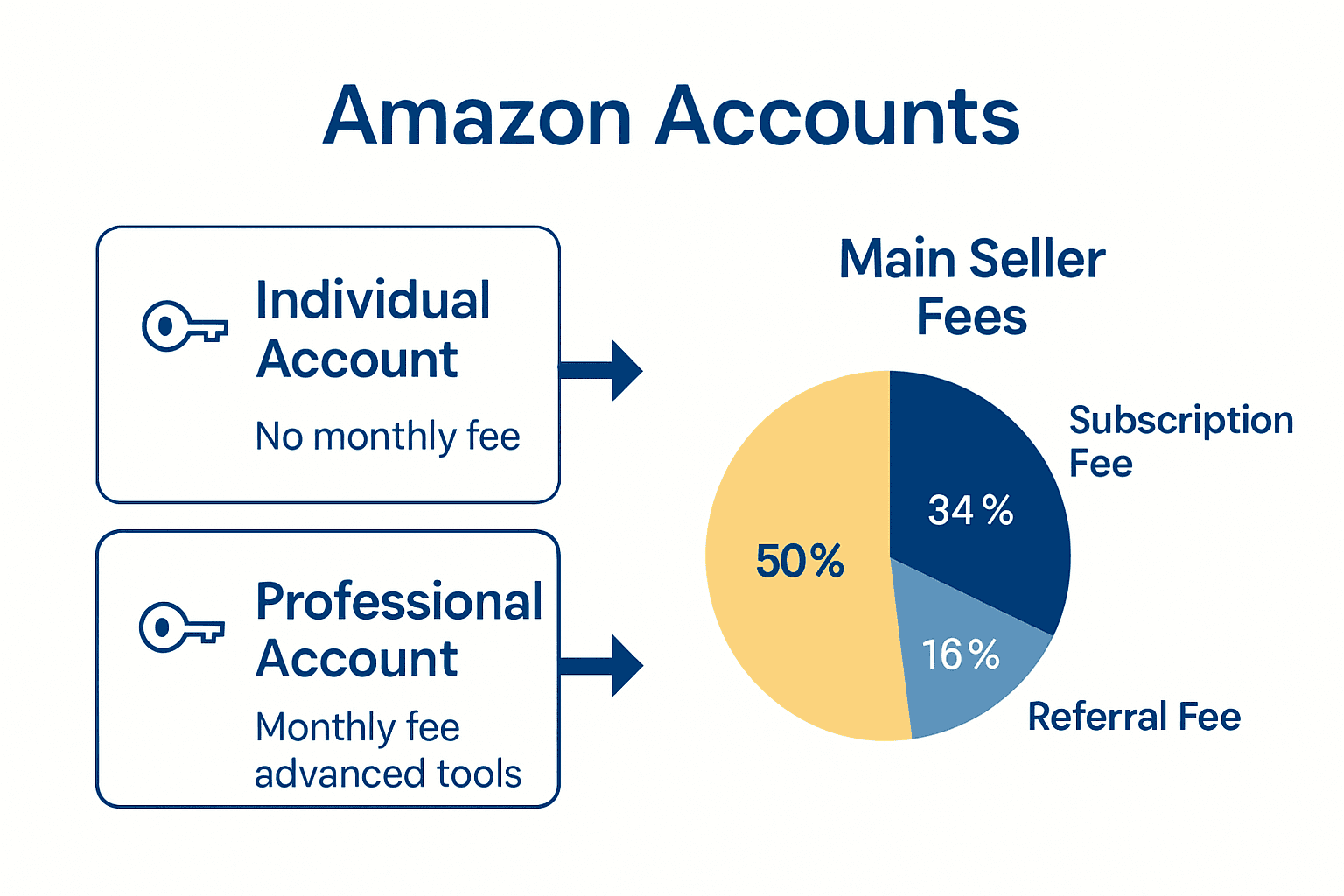
When diving into Amazon’s selling ecosystem, understanding the different account types and eligibility requirements is crucial for your success. According to Amazon’s official registration guide, sellers can choose between two primary account types: Individual and Professional, each designed to meet different business needs and sales volumes.
Individual vs Professional Account Comparison
Individual Account
- Best for sellers selling fewer than 40 items per month
- No monthly subscription fee
- Per-item selling fee charged
- Limited access to advanced selling tools
Professional Account
- Ideal for high-volume sellers
- Monthly subscription fee
- No per-item selling fee
- Access to advanced selling features and analytics
Eligibility for selling on Amazon requires meeting specific documentation and verification standards.
 Amazon’s marketplace guidelines outline key requirements that sellers must satisfy:
- Valid credit card
- Working phone number
- Tax identification information
- Business verification documents (depending on location and product type)
Choosing the right account type depends on your business scale, sales projections, and long-term e-commerce strategy. Professional accounts offer more robust tools and lower per-item fees, making them attractive for serious sellers planning significant growth. Individual accounts provide a low-risk entry point for those testing the Amazon marketplace or selling occasional items.

Here’s a comparison of Amazon’s Individual and Professional Seller Accounts:
| Feature | Individual Account | Professional Account |
|---|---|---|
| Monthly Fee | None | Required |
| Per-Item Fee | Yes | No |
| Best for | Fewer than 40 sales/month | High-volume sellers |
| Advanced Tools | Limited | Full access |
| Sales Reports | Basic | Advanced analytics |
| Eligibility | Basic docs | Enhanced verification |
Navigating Seller Central Key Features
Seller Central transforms complex e-commerce management into an intuitive digital dashboard, providing sellers with powerful tools to streamline their online business operations. According to Amazon’s official registration guide, the platform offers a comprehensive suite of features designed to help merchants effectively manage their Amazon marketplace presence.
Core Dashboard Features
Key features that define the Seller Central experience include:
- Inventory Management: Real-time tracking of stock levels
- Order Processing: Seamless shipping and tracking workflows
- Performance Metrics: Detailed sales analytics and performance insights
- Pricing Tools: Dynamic pricing strategies and competitive analysis
- Customer Messaging: Direct communication channels with buyers
The platform’s reporting capabilities are particularly robust. Sellers can generate detailed reports that provide deep insights into sales trends, helping them make data-driven decisions about product strategy, pricing, and inventory management. Amazon’s seller documentation highlights the importance of these analytical tools in optimizing marketplace performance.
Effective navigation of Seller Central requires understanding each feature’s nuanced capabilities. From setting up targeted advertising campaigns to managing customer feedback and tracking inventory in real-time, sellers gain access to a powerful ecosystem that simplifies the complexities of online selling. Check out our guide on Amazon content workflow for additional strategies to maximize your Seller Central experience.
Seller Fees, Costs, and Financial Implications
Navigating the financial landscape of Amazon selling requires a comprehensive understanding of the various fees and costs that can impact your profitability. According to Amazon’s official registration guide, sellers must carefully consider multiple fee structures that can significantly influence their bottom line.
Primary Fee Categories
Amazon’s fee structure encompasses several key components:
Subscription Fees
- Professional Account: Monthly fee
- Individual Account: Per-item selling fees
Referral Fees
- Percentage of sale price varies by product category
- Typically ranges from 8% to 15%
- Differs based on product type and sales channel
Fulfillment Costs
- Amazon FBA (Fulfillment by Amazon) fees
- Storage fees for inventory
- Long-term storage charges for items held over extended periods
Amazon’s seller documentation emphasizes the importance of understanding these financial implications. Sellers must factor in not just the obvious costs, but also potential additional expenses like long-term storage fees, which can quickly erode profit margins.
Successful Amazon sellers develop sophisticated pricing strategies that account for these complex fee structures. Check out our guide on Amazon content workflow to learn how to optimize your pricing and minimize unnecessary expenses. The key is to create a comprehensive financial model that considers all potential costs, ensuring your Amazon business remains profitable and sustainable.
Common Challenges and How to Avoid Them
Amazon selling presents a minefield of potential pitfalls that can derail even the most promising e-commerce venture. Account suspensions and performance issues are among the most critical challenges sellers face, requiring meticulous attention and proactive management. According to Amazon Seller Central forums, understanding and navigating these challenges is crucial for long-term marketplace success.
Key Challenges and Strategic Solutions
Critical challenges sellers must anticipate include:
Policy Compliance
- Read and understand Amazon’s selling policies thoroughly
- Keep documentation current and accurate
- Regularly review account health metrics
Performance Management
- Monitor customer feedback consistently
- Respond promptly to customer inquiries
- Maintain high performance metrics
- Address negative reviews professionally
Amazon’s seller documentation emphasizes the importance of proactive customer communication and continuous performance improvement. Sellers who develop robust systems for tracking and responding to potential issues can significantly reduce their risk of account complications.
Check out our guide on Amazon content workflow for comprehensive strategies to navigate these challenges. Success on Amazon isn’t just about selling products—it’s about creating a seamless, customer-centric experience that meets the platform’s rigorous standards.
Unlock Your Amazon Selling Potential with Expert Guidance
Navigating Amazon Seller Central can feel overwhelming with its complex features like inventory management, performance analytics, and fee structures. If you are struggling with optimizing your listings or managing your account to avoid suspensions and maximize profits, you are not alone. Key challenges include mastering product listing optimization and using data-driven strategies to improve visibility and maintain high performance metrics.

Take control of your Amazon business today with proven support. Explore our E-commerce Tips & Strategies to Grow Your Online Business to learn how to enhance your titles, bullet points, and backend keywords for greater reach. Visit Search Oneers to start transforming your Amazon listings with our expert Amazon SEO and analytics services. Don’t wait to turn complexity into opportunity—take the next step now and boost your marketplace success.
Frequently Asked Questions
What is Amazon Seller Central?
Amazon Seller Central is a web platform that enables third-party sellers to manage their online business on Amazon, allowing them to list products, track sales, process orders, and interact with customers.
What are the differences between Individual and Professional seller accounts?
Individual accounts are suitable for sellers with fewer than 40 sales per month, have no monthly fee, but charge per-item fees. Professional accounts are for high-volume sellers, come with a monthly subscription fee, and do not charge per-item fees while providing access to advanced selling tools.
What fees should I expect when selling on Amazon?
Sellers can expect several fees, including monthly subscription fees for Professional accounts, per-item selling fees for Individual accounts, referral fees based on the sale price of products, and fulfillment costs like storage and handling fees if using Fulfillment by Amazon (FBA).
How can sellers avoid account suspensions on Amazon?
To avoid account suspensions, sellers should thoroughly understand Amazon’s selling policies, maintain accurate documentation, consistently monitor customer feedback, respond promptly to inquiries, and adhere to performance metrics guidelines.

Comments
2 responses to “Seller Central Explained: Complete Guide for Amazon Sellers”
[…] Seller Central Explained: Complete Guide for Amazon Sellers reveals that Amazon Business Reports offer sellers a robust set of metrics and features designed to provide comprehensive insights into their marketplace performance. Up University highlights that these analytics enable administrators to monitor activity across multiple dimensions including group, user, and product category. […]
[…] Seller Central Explained: Complete Guide for Amazon Sellers – Searchoneers […]