

TL;DR:
- Amazon FBA allows sellers to store, ship, and handle returns through Amazon’s logistics network. Most serious sellers choose the Professional plan and focus on inventory prep, accurate labeling, and strategic restocking. Monitoring fees, inventory age, and costs ensures profitability and sustainable growth in the platform.
Amazon FBA, or Fulfillment by Amazon, is a program where Amazon stores your products, picks and packs orders, ships to customers, and handles returns and customer service on your behalf. Learning how to sell on Amazon FBA is one of the fastest paths to building a scalable online business without managing your own warehouse. Roughly 73% of all US third-party Amazon sellers use FBA as their primary fulfillment method in 2026. That number tells you this is not a niche strategy. It is the standard.
How to sell on Amazon FBA: what you need to get started
Before you ship a single unit, you need two things in place: an Amazon seller account and a product worth selling. These are not interchangeable steps. Get them wrong and everything downstream costs more time and money.

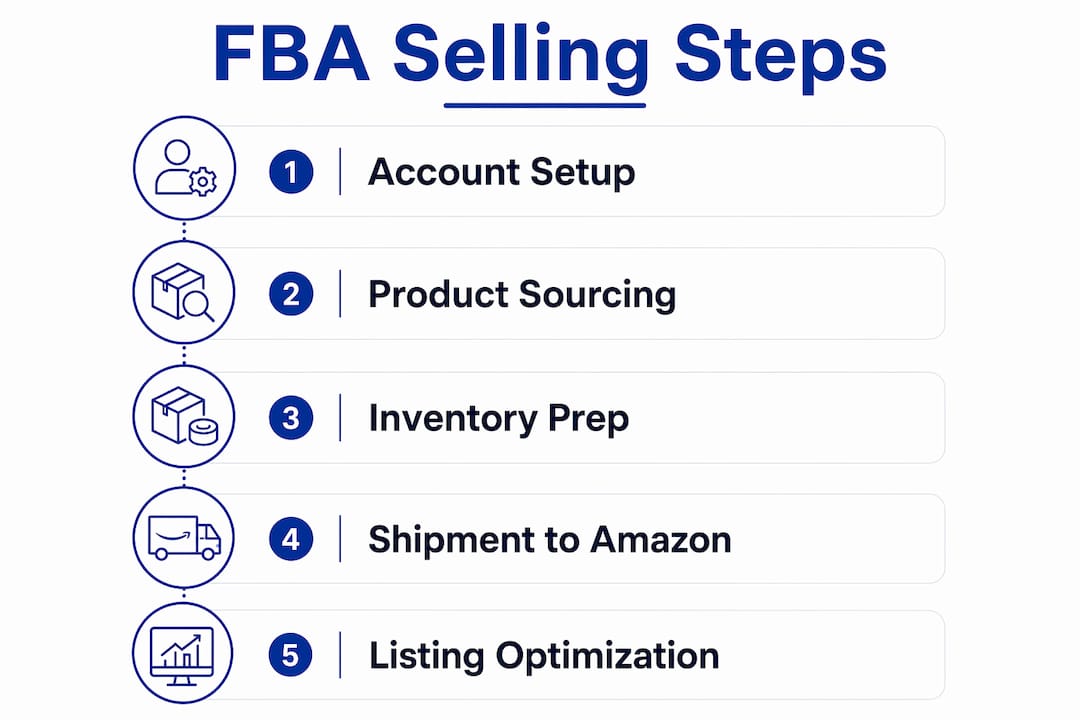
Setting up your Amazon Seller Central account is the first move. Seller Central is your control panel for listings, inventory, pricing, and analytics. Seller Central and FBA are separate but complementary tools. Seller Central manages your business operations. FBA manages the physical logistics. Confusing the two leads to inventory errors and unexpected costs.
You choose between two selling plans at signup:
- Individual plan: No monthly fee, but Amazon charges $0.99 per item sold. Best for sellers moving fewer than 40 units per month.
- Professional plan: $39.99 per month with no per-item fee. Required for advertising, Buy Box eligibility, and bulk listing uploads.
Most serious sellers start with the Professional plan immediately. The math favors it once you pass 40 units per month, and the added features are worth it from day one.
For product sourcing, your main options are wholesale suppliers, private label manufacturing (often through Alibaba), retail arbitrage, and online arbitrage. Private label gives you the most control over branding and margins. Retail arbitrage is faster to start but harder to scale.
You also need basic physical tools: a barcode printer for FNSKU labels, a postal scale for accurate weight measurements, and appropriate packaging materials. Compliance with Amazon’s labeling and packaging guidelines is non-negotiable. Shipments that arrive incorrectly labeled get rejected or hit with prep fees.
Pro Tip: Before you source inventory, check Amazon’s restricted products list and category approval requirements. Some categories, like grocery, beauty, and automotive, require ungating before you can sell.
Step-by-step: listing products and prepping inventory for FBA
Once your account is live and your product is sourced, the process follows a clear sequence. Skipping steps here causes delays at the warehouse.
Create your product listing in Seller Central. Go to Catalog > Add Products. Fill in the product title, bullet points, description, images, and backend keywords. A strong listing drives both search visibility and conversion. If you need help with this, Searchoneers specializes in Amazon listing optimization that captures more traffic and converts browsers into buyers.
Enroll the listing in FBA. In Seller Central, go to Manage Inventory, select your product, and choose “Change to Fulfilled by Amazon.” Amazon will generate an FNSKU barcode specific to your product.
Prep and label your inventory. Each unit needs an FNSKU label covering the original barcode. Products must be packaged to survive warehouse handling and shipping. Poly bags, bubble wrap, and box inserts are common requirements depending on product type. Precise packaging compliance is critical. Shipments that fail Amazon’s prep standards get refused or charged costly Amazon-prep fees.
Create a shipment using the “Send to Amazon” workflow. This tool in Seller Central walks you through entering product quantities, confirming packaging type, and printing box labels. Amazon assigns you to specific fulfillment centers based on your product category and inventory distribution strategy.
Dimension and weigh every box accurately. Inaccurate product dimensioning causes processing delays and incorrect fee assessments. Use a certified postal scale and a tape measure. Do not estimate.
Ship your inventory to the assigned Amazon warehouse. You can use Amazon’s partnered carrier rates (UPS or USPS) directly through Seller Central, which are typically discounted.
Pro Tip: Use the “Ships in Product Packaging” (SIPP) program if your product’s original packaging is sturdy enough. SIPP reduces prep requirements and can lower your per-unit costs.
| Step | Action | Key detail |
|---|---|---|
| Listing creation | Add product in Seller Central | Include keywords in title and bullets |
| FBA enrollment | Change fulfillment method to FBA | Amazon generates FNSKU barcode |
| Inventory prep | Label and package each unit | Must meet Amazon’s prep standards |
| Shipment creation | Use “Send to Amazon” workflow | Amazon assigns fulfillment centers |
| Shipping | Send via partnered carrier | Use Seller Central for discounted rates |
What happens after your inventory reaches Amazon’s warehouse?
Once Amazon receives your shipment, the process moves fast. Inventory is typically processed and available for sale within 1 to 3 days of warehouse delivery. That means your products can be live and purchasable within the same week you ship them.
Here is what Amazon handles from that point forward:
- Order picking and packing: Amazon’s fulfillment staff locate, pack, and label each order automatically when a customer buys.
- Shipping and tracking: Amazon ships orders using its own carrier network and provides tracking to customers.
- Prime badge: Your products become eligible for Amazon Prime, including two-day shipping. The Prime badge drives sales because fast shipping is often the deciding factor for buyers.
- Customer service: Amazon handles all buyer inquiries, complaints, and returns on your behalf.
- Returns processing: Returned items are inspected. Sellable units go back into your inventory. Unsellable units are flagged as unfulfillable.
One critical detail: Amazon charges aged inventory surcharges on products stored for more than 181 days. Slow-moving inventory gets expensive fast. Monitor your FBA inventory age report in Seller Central weekly and run removal orders or price promotions before products hit that threshold.
You can track all of this through the FBA dashboard inside Seller Central. The dashboard shows inventory levels, sales velocity, stranded listings, and restock recommendations in real time.
How to manage costs and stay profitable on Amazon FBA
Profitability on Amazon FBA is not automatic. The fee structure is layered, and sellers who ignore the details lose margin quickly.
The 2026 fee structure breaks down like this:
| Fee type | Rate | Notes |
|---|---|---|
| Fulfillment fee | From $3.06 per unit | Based on size and weight |
| Storage fee (Jan–Sep) | $0.78 per cubic foot/month | Standard-size products |
| Storage fee (Oct–Dec) | $2.40 per cubic foot/month | Peak season rate |
| Referral fee | ~15% of sale price | Varies by category |
Those numbers add up. FBA real costs often total 30–40% of revenue when you factor in referral fees, fulfillment fees, advertising, and returns. A healthy net margin target is 20–25%. Sellers who fall below 15% net margin are typically not sustainable long term.
Hidden costs catch new sellers off guard most often:
- Inbound placement fees: Amazon charges to distribute your inventory across multiple fulfillment centers.
- Aged inventory surcharges: Products past 181 days in storage trigger additional fees.
- Returns processing fees: High return rates in certain categories add up quickly.
- Advertising spend: Sponsored Products campaigns are often necessary to rank, especially for new listings.
Use the Amazon FBA Revenue Calculator (available free inside Seller Central) before you source any product. Plug in your cost of goods, expected sale price, and product dimensions. If the margin does not clear 20% after all fees and estimated ad spend, reconsider the product.
Pro Tip: Run a reimbursement audit every quarter. Amazon may owe you money for lost or damaged inventory inside their warehouses. These amounts can reach hundreds or thousands of dollars annually and go unclaimed if you do not check.
For a detailed breakdown of what each fee tier means for your bottom line, Searchoneers has a full guide on Amazon seller fees in 2026.
Common challenges new FBA sellers face and how to fix them
Every new FBA seller hits the same set of problems. Knowing them in advance cuts your learning curve significantly.
- Shipment rejections: These happen when packaging does not meet Amazon’s prep standards. Use third-party prep centers for overseas shipments if you cannot inspect inventory yourself. They catch problems before Amazon does.
- Inaccurate measurements: Wrong dimensions on your shipping boxes trigger fee errors and processing delays. Measure every box before creating your shipment plan.
- Aged inventory buildup: Products that sit too long become a cost center. Set restock alerts in Seller Central and use reusable case pack templates to speed up replenishment cycles. Gaps in stock hurt your Best Sellers Rank (BSR) and are hard to recover from.
- Unfulfillable returns: Returned items that Amazon marks as unsellable need a decision: remove them, relist them after inspection, or dispose of them. Letting them sit costs storage fees.
- Over-reliance on FBA for every product: Not every product belongs in FBA. Slow movers, oversized items, and seasonal products often perform better under a hybrid model that combines FBA with Fulfillment by Merchant (FBM). FBM lets you fulfill orders yourself for products where FBA fees would eliminate your margin.
For a broader view of managing stock levels and avoiding costly gaps, the inventory management guide at ParcelPlanet covers e-commerce best practices that apply directly to FBA sellers.
Key takeaways
Selling successfully on Amazon FBA requires understanding the fee structure, prepping inventory correctly, and monitoring stock age before costs compound.
| Point | Details |
|---|---|
| FBA handles logistics | Amazon stores, ships, and manages returns so you focus on sourcing and growth. |
| Account setup comes first | Choose the Professional plan and understand Seller Central before shipping inventory. |
| Prep accuracy prevents delays | Correct labeling, packaging, and dimensions stop shipment rejections and fee errors. |
| Fees stack fast | Target a net margin of 20–25% after fulfillment, referral, storage, and ad costs. |
| Monitor inventory age | Products past 181 days in storage trigger surcharges; use removal orders proactively. |
What I have learned after years of watching sellers use FBA
The sellers who struggle most with FBA are not the ones who make big mistakes. They are the ones who treat Seller Central and FBA as one system instead of two. Seller Central is your business brain. FBA is your warehouse. When you blur that line, you make decisions in the wrong place and miss signals that cost you money.
The second pattern I see constantly: sellers who launch a product, get early traction, and then run out of stock because they did not set restock alerts. Losing your BSR ranking after a stockout can take weeks to recover. That lost momentum is real revenue gone.
My honest advice is to start with one product, one supplier, and one fulfillment strategy. Get your fee math right before you scale. Use the FBA Revenue Calculator obsessively in the early months. And do not skip the reimbursement audit. Amazon’s warehouses lose and damage inventory more often than most sellers realize, and that money is yours to claim.
FBA is not a shortcut. It is a system. Sellers who respect the system, learn its rules, and manage their numbers carefully build businesses that last. The ones who treat it as passive income from day one usually quit within a year.
— Goga
How Searchoneers helps you get more from your FBA listings
Getting your inventory into Amazon’s warehouse is only half the equation. If your listing does not rank and convert, the fulfillment infrastructure means nothing.

Searchoneers works with Amazon sellers to build listings that perform. From title structure and bullet point copy to backend keyword strategy and A+ content, every element is built to capture search traffic and turn clicks into sales. The team at Searchoneers uses data-backed methods that align with Amazon’s A10 algorithm, so your products rank for the terms buyers actually search. If you are ready to get more visibility from the inventory you are already selling, the Amazon listing enhancement guide is the right place to start. You can also explore the full listing optimization workflow to see exactly how the process works from audit to publish.
FAQ
What is Amazon FBA and how does it work?
Amazon FBA (Fulfillment by Amazon) is a program where sellers send inventory to Amazon’s warehouses and Amazon handles storage, packing, shipping, customer service, and returns. Sellers pay fulfillment and storage fees in exchange for access to Amazon’s logistics network and Prime eligibility.
What does an Amazon FBA seller do?
An Amazon FBA seller sources products, creates listings in Seller Central, ships inventory to Amazon fulfillment centers, and manages pricing, advertising, and restocking. Amazon handles all physical order fulfillment after inventory arrives at the warehouse.
How much does it cost to start selling on Amazon FBA?
Costs vary by product, but plan for the $39.99 monthly Professional plan fee, fulfillment fees starting at $3.06 per unit, storage fees, referral fees of roughly 15%, and initial inventory costs. Total FBA costs often reach 30–40% of revenue, so target a net margin of 20–25%.
How long does it take for Amazon to process FBA inventory?
Amazon typically processes and makes inventory available for sale within 1 to 3 days of receiving your shipment at a fulfillment center.
Can I sell on Amazon FBA as a beginner with no experience?
Yes. Amazon Seller Central guides you through account setup, listing creation, and the “Send to Amazon” shipment workflow. The learning curve is real, but the process is documented and repeatable. Starting with one product and mastering the fee structure before scaling is the most reliable path forward.
