

TL;DR:
- Amazon’s visual search uses AI-powered tools like Amazon Lens and AI-generated previews to transform product images into search inputs. Optimizing high-resolution, clear images that highlight color, texture, and shape is essential for better ranking and matching accuracy. Continuous testing and refinement of images and variants are crucial for improving visibility and sales in Amazon’s evolving visual discovery environment.
Amazon picture search is the practice of using image-based queries to find products on Amazon, powered by Amazon Lens, AI-generated previews, and real-time camera tools. For sellers, this shift from text to visual discovery is not a trend to watch. It is a ranking factor to act on now. Your product images are no longer just sales assets. They are search inputs that Amazon’s AI reads, matches, and ranks against shopper intent.

What is amazon visual search and how does it work?
Amazon’s visual search suite goes well beyond a simple photo upload. The platform has built a layered system of tools that each serve a different stage of the shopping journey.
Amazon Lens is the core engine. Shoppers can upload images, circle a specific object within that image, and adjust the bounding box to isolate exactly what they want to find. Once the object is selected, they can tap “More Like This” to pull up visually similar products from Amazon’s catalog. This is not a fuzzy match. Amazon’s AI reads color, texture, shape, and material from the image and maps those attributes to indexed listings.
Circle to Search takes this further. Instead of uploading a saved photo, shoppers circle an item they see anywhere on their screen and trigger a search directly. This means a product spotted in a social media post or a screenshot can become a live Amazon search in seconds.
Lens Live adds real-time camera capability. Point your phone at a physical object, and Amazon’s AI identifies it and surfaces matching products. Alexa integration is built in, so voice and vision work together. These features are rolling out through the Amazon Shopping app on Android and iOS in the US in 2026, making them immediately relevant to your listing strategy.
AI-generated image previews are the newest addition. These previews appear below the search bar in the Amazon Shopping app, updating in real time as shoppers type attribute keywords like color, texture, or pattern. They help shoppers visualize what they want before results even load. This feature is most active in apparel and home categories, where visual attributes drive purchase decisions.
Pro Tip: If you sell in apparel or home decor, your main image must communicate color, texture, and pattern clearly. AI previews are generated from catalog data, and your listing feeds that data.
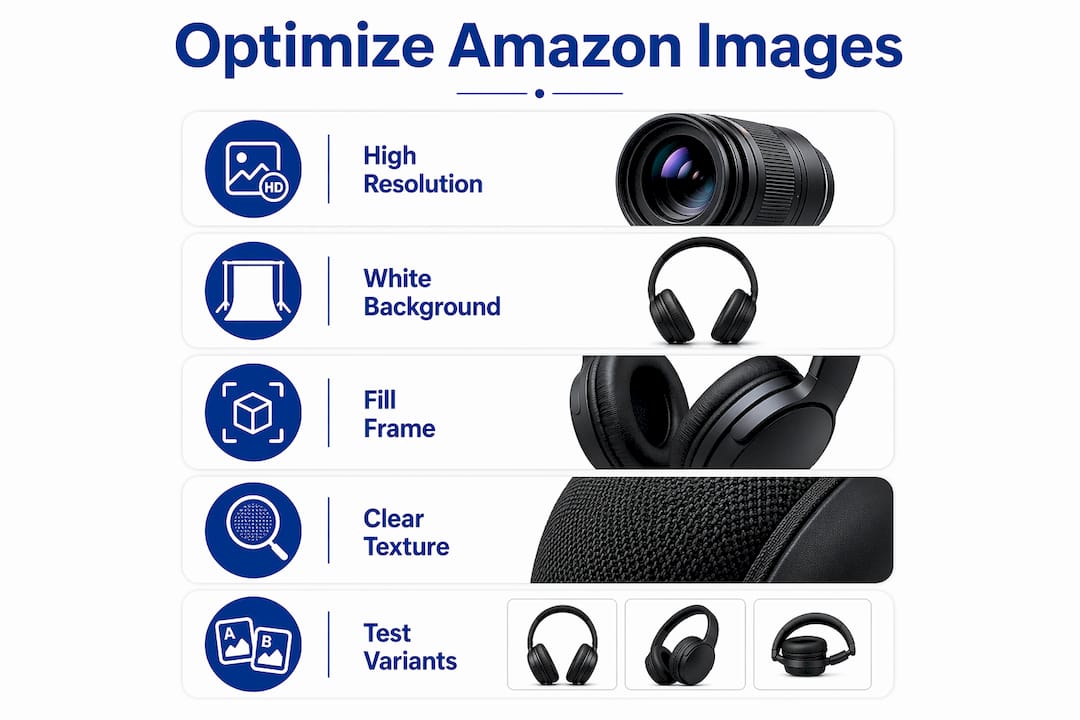
How to optimize product images for amazon’s image search
Image optimization for Amazon’s visual search is not about aesthetics alone. It is about giving Amazon’s AI enough structured visual data to match your product to shopper queries.
Technical specs that actually matter
Amazon recommends high-resolution JPEG images with a pure white background and the product filling 85–100% of the frame. The minimum resolution is 1,000 pixels on the longest side, but 1,600 pixels or more is the real target. That threshold unlocks zoom functionality, which directly affects shopper engagement.
Zoom-ready images at 1,600+ pixels improve both user interaction and AI attribute matching. Images below that threshold lose zoom interaction and may underperform in visual product matching. The 72 dpi minimum applies, and while JPEG is preferred, Amazon also accepts PNG, TIFF, and GIF formats.
| Image Attribute | Minimum Standard | Recommended for Visual Search |
|---|---|---|
| Resolution (longest side) | 1,000 pixels | 1,600+ pixels |
| File format | JPEG, PNG, TIFF, GIF | JPEG |
| Background | Pure white | Pure white (RGB 255, 255, 255) |
| Product fill | 85% of frame | 85–100% of frame |
| DPI | 72 dpi | 72 dpi or higher |
Quality over quantity: the image count myth
More images do not automatically improve your visual search performance. Adding images to a listing does not guarantee better results. Amazon Seller Central forums consistently stress A/B testing image counts per ASIN to find what actually moves the needle for your specific product. One sharp, attribute-rich image outperforms five mediocre shots every time.
High-performing sellers treat images as structured attribute carriers, making sure each photo clearly shows color, material, and size cues that align with the text refinements shoppers apply during visual searches. Think of your image set as a visual product spec sheet. Every shot should answer a specific shopper question.
Pro Tip: Run a split test on your hero image first. Swap between a lifestyle shot and a clean white-background image for two weeks and compare CTR and CVR data in Brand Analytics. The winner tells you what Amazon’s algorithm and your shoppers both prefer.
How to use amazon picture search step by step
Understanding how shoppers use these tools helps you build images that perform inside each feature. Here is how the full picture search on Amazon works from the shopper side, and what it means for your listings.
Accessing amazon lens
- Open the Amazon Shopping app on Android or iOS.
- Tap the camera icon in the search bar to launch Amazon Lens.
- Choose to upload a photo from your camera roll or use your live camera.
- If using a photo, tap and drag to draw a circle around the specific item you want to search.
- Adjust the bounding box to tighten or widen the selection area.
- Tap “Search” to see matching products from Amazon’s catalog.
Refining searches with text constraints
Shoppers can add text phrases to uploaded images to narrow results by attribute. A phrase like “like this but in white” tells Amazon to return visually similar products that also match the color constraint. This is where your backend keywords and image attributes intersect. If your listing does not carry the right color and material attributes in its metadata, it will not surface in these refined searches even if your image is perfect.
Using visual search for competitive research
- Search for your own product category using Lens to see which competitor listings surface first.
- Note the image styles, backgrounds, and angles that appear in top results.
- Identify visual gaps in your own listing compared to what ranks well.
- Use “More Like This” on top-performing competitor products to map the visual attributes Amazon’s AI is prioritizing in your category.
This kind of Amazon competitor analysis gives you a direct read on what Amazon’s visual algorithm rewards, without guessing.
What goes wrong with amazon’s visual search features?
Visual search tools create new failure points that text-based SEO does not. Knowing where sellers trip up saves you time and lost sales.
- AI-generated previews set expectations your listing must meet. AI images are conceptual guides, not exact product matches. If a shopper arrives at your listing after seeing an AI preview and your product looks significantly different, bounce rates climb. Your real product photos must be the most compelling visual on the page.
- Secondary images are not optional for visual search. “More Like This” and “Circle to Search” perform best when listings include secondary images that isolate specific products or parts against clean backgrounds. A lifestyle image with five products in frame confuses the AI. A clean secondary shot of just your product, from a distinct angle, improves matching accuracy.
- Low-resolution images break zoom and hurt AI matching. Images below 1,000 pixels on the longest side lose zoom capability entirely. They also give Amazon’s AI less data to work with when matching visual attributes. This is a double penalty: worse shopper experience and weaker algorithmic performance.
- Variant attributes must align with image content. If your listing shows a blue product but the variant is labeled “navy,” Amazon’s AI may not connect the image to searches for “navy blue.” Your image color must match your variant attribute label exactly.
Pro Tip: For each product variant, create a dedicated secondary image that shows only that variant against a white background. This gives “Circle to Search” a clean target and reduces AI confusion when shoppers refine by color or style.
Optimizing images on Amazon is not a one-time task. Treat your image set as a living asset that you test and refine as Amazon’s visual tools evolve.
Key takeaways
Amazon visual search rewards sellers who treat product images as structured data, not just sales photography.
| Point | Details |
|---|---|
| Amazon Lens is the core tool | Shoppers upload images, circle objects, and refine by text to find exact products. |
| Resolution drives performance | Use 1,600+ pixels on the longest side to unlock zoom and improve AI attribute matching. |
| Quality beats quantity | A/B test image counts per ASIN; one strong image outperforms several weak ones. |
| Secondary images matter | Clean, isolated secondary shots improve “More Like This” and “Circle to Search” accuracy. |
| Variant labels must match images | Mismatched color labels and image content cause your listing to miss refined visual searches. |
Why sellers who ignore visual search are leaving sales behind
I have reviewed hundreds of Amazon listings over the years, and the pattern is consistent. Sellers spend hours on keyword research and backend optimization, then upload a 600-pixel JPEG with a gray background and call it done. That approach worked in 2019. It does not work now.
What I find most interesting about Amazon’s visual search push is what it reveals about shopper behavior. Shoppers increasingly cannot describe what they want in words. They know it when they see it. Amazon Lens and AI-generated previews are built for exactly that moment. The sellers who win are the ones who understand that clear visual attributes in images increase search effectiveness because Amazon’s Director of Search, Mihir Bhanot, has said directly that images should distinctly show color, texture, material, and shape.
My honest advice: stop thinking about your hero image as a product photo and start thinking of it as a search query answer. What visual question is your shopper asking? Your image is the answer Amazon’s AI will serve up or skip over.
The sellers I see gaining ground in 2026 are the ones running systematic image tests, building variant-specific secondary shots, and checking their listings against Lens results monthly. They treat image optimization the same way they treat keyword optimization: as an ongoing, data-driven practice. That mindset is the real competitive edge.
— Goga
Ready to make your listings visually unbeatable?
Your images are doing more work than you realize. They feed Amazon’s AI, drive shopper clicks, and determine whether your product surfaces in visual searches or disappears behind competitors. Getting that right requires a structured approach, not guesswork.

Searchoneers builds exactly that structure for you. From listing enhancement strategies that align your images with Amazon’s visual search requirements to a full listing optimization workflow that covers every element Amazon’s algorithm evaluates, Searchoneers gives you the tools and expertise to compete where it counts. Your next sale could start with a shopper pointing a camera at a product. Make sure your listing is the one they find.
FAQ
What is amazon lens and how does it work?
Amazon Lens is Amazon’s visual search tool that lets shoppers upload images or use a live camera to find matching products. Users can circle specific objects within an image to refine their search and tap “More Like This” for visually similar results.
How do i search images on amazon using my phone?
Open the Amazon Shopping app, tap the camera icon in the search bar, and either upload a photo or point your camera at an object. Amazon Lens will identify the item and return matching products from the catalog.
What image resolution does amazon recommend for visual search?
Amazon requires a minimum of 1,000 pixels on the longest side, but 1,600+ pixels is the recommended standard for zoom functionality and optimal AI attribute matching.
Do more product images improve amazon visual search performance?
Not automatically. Image quality and variant alignment matter more than image count. A/B testing image quantity per ASIN is the most reliable way to find what works for your specific product.
What are ai-generated image previews on amazon?
AI-generated previews appear below the search bar in the Amazon Shopping app and update in real time as shoppers type attribute keywords. They help shoppers visualize products before results load, making your listing’s real images the critical differentiator.
