

TL;DR:
- Publishing on Amazon via Kindle Direct Publishing is free and provides instant access to a global audience. Success depends on optimizing metadata, strategic pricing, and ongoing marketing efforts outside KDP. Authors should invest in professional editing and cover design, continuously refresh keywords and categories, and leverage promotion tools like KDP Select and external outreach to boost sales.
Selling an eBook on Amazon means publishing through Kindle Direct Publishing (KDP), Amazon’s free self-publishing platform that gives any author instant access to millions of readers worldwide. Knowing how to sell ebook on Amazon is simpler than most aspiring authors expect. KDP charges zero upfront cost and pays royalties on every sale or Kindle Unlimited page read. You keep creative control, set your own price, and reach global markets from day one. This guide walks you through every step, from account setup to launch marketing, so you can publish with confidence and start earning.
What do you need to sell an eBook on Amazon?
Before you upload a single file, you need the right accounts, files, and assets in place. Skipping this prep work is the most common reason first-time authors face delays or formatting disasters after publishing.
Setting up your KDP account
Go to kdp.amazon.com and sign in with your existing Amazon account or create a new one. KDP requires you to complete your tax information (a W-9 for US authors or a W-8BEN for international authors) and add a bank account for royalty deposits. Without both, Amazon holds your payments. The setup takes about 20 minutes and only needs to happen once.

Manuscript and cover requirements
KDP accepts manuscripts in several formats, with EPUB being the preferred standard for clean Kindle rendering. Microsoft Word (.docx) files also work well for most text-heavy books. Your cover image must be a JPEG or TIFF file with a minimum resolution of 2,560 x 1,600 pixels and an ideal aspect ratio of 1.6:1. A poorly designed cover kills sales before a reader ever reads your description.
Pro Tip: Use Canva or hire a professional designer from Reedsy for your cover. Readers judge books by their covers, and a $50 investment in design can double your click-through rate.
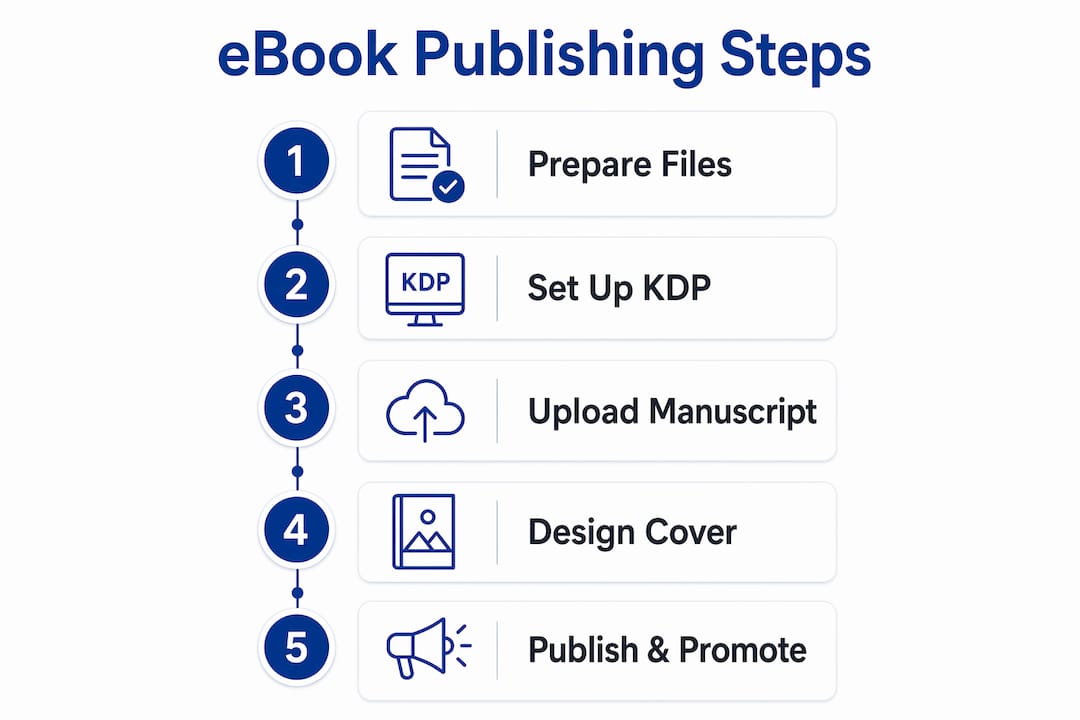
Here is a quick reference for everything you need before hitting “Publish”:
| Asset | Requirement |
|---|---|
| Manuscript file | EPUB or .docx, properly formatted |
| Cover image | JPEG or TIFF, 2,560 x 1,600 px minimum |
| KDP account | Tax info and bank details completed |
| Book metadata | Title, subtitle, author name, description, keywords |
| ISBN | Optional for Kindle; KDP assigns a free ASIN |
How do you publish your eBook step by step on KDP?
The KDP publishing workflow is straightforward once you know what each screen asks for. Work through these steps in order and you will avoid the most common publishing mistakes.
- Log in to KDP and click “Create.” Select “Kindle eBook” from the dashboard.
- Enter your book details. Add your title, subtitle, author name, and series information if applicable. This metadata feeds directly into Amazon’s search index.
- Write your book description. This is your sales page. Use HTML formatting tags (bold, italics, paragraph breaks) to make it scannable and persuasive.
- Upload your manuscript and cover. Use KDP’s built-in previewer to check formatting on multiple Kindle device sizes before proceeding.
- Select your keywords and categories. KDP allows up to seven keywords and two categories. Choose these carefully because metadata drives discoverability.
- Set your price and royalty tier. Pricing between $2.99 and $9.99 qualifies you for the 70% royalty tier. Pricing outside that range drops you to 35%.
- Choose KDP Select enrollment. KDP Select is a free 90-day program that requires Amazon exclusivity but unlocks Kindle Unlimited inclusion, Free Book Promotions, and Kindle Countdown Deals.
- Set a pre-order or publish immediately. A pre-order can be scheduled up to one year in advance and builds early ranking momentum before your official launch date.
Pro Tip: Compress images inside your manuscript before uploading. Amazon deducts a delivery fee per megabyte from your 70% royalties, so a leaner file means more money per sale.
Understanding royalties and payment timing
The 70% royalty tier is the goal for most authors, but it comes with the delivery fee caveat. A 5 MB file at $0.15 per MB costs $0.75 per sale in delivery fees. Keep your file under 3 MB when possible. Amazon pays royalties approximately 60 days after the month in which sales occurred, with a minimum payout threshold of $100. Plan your cash flow accordingly, especially in your first few months.
KDP Select trade-offs
KDP Select is not right for every author. The 90-day exclusivity means you cannot sell your eBook on your own website, through other retailers, or anywhere else during that period. The upside is real: Kindle Unlimited enrollment puts your book in front of millions of subscribers who pay per page read, and promotional tools like Kindle Countdown Deals can spike your ranking fast. Authors with a single title and no existing audience usually benefit from enrolling. Authors with an established multi-platform following may prefer to stay wide.
How does metadata optimization boost your eBook’s visibility?
Metadata is the engine behind your eBook’s organic discoverability on Amazon. Your title, keywords, categories, and description tell Amazon’s algorithm exactly where to rank your book and which search queries to match it against.
Effective keyword research for Amazon starts with Amazon’s own search bar. Type your topic into the search field and note the autocomplete suggestions. Those suggestions reflect real buyer searches. Use them as your seven KDP keywords rather than generic terms you assume people search for.
- Choose specific categories. Narrow subcategories have less competition and make it easier to rank as a bestseller. A book on personal finance for millennials fits better in “Personal Finance / Budgeting & Money Management” than the broad “Business & Money” category.
- Write a description that sells. Lead with your reader’s core problem, then present your book as the solution. Use short paragraphs and bold text to highlight key benefits. Amazon allows HTML formatting in descriptions.
- Test and update your keywords. Metadata is not a one-time task. Check your keywords every 30–60 days and swap out underperformers based on your KDP sales dashboard data.
- Use both category slots. Many authors waste one category slot. Both slots matter. Research which categories your direct competitors rank in and target the same ones.
Pro Tip: Search your chosen keywords on Amazon and look at the bestseller rank of the top results. If the top books have a rank above 100,000, that category is competitive enough to have real traffic but winnable with a strong listing.
A well-optimized listing does not just rank higher. It converts better because readers immediately understand what the book delivers. Pair your metadata work with a strong Amazon listing checklist to make sure no element gets overlooked.
What marketing tactics actually move eBook sales?
Publishing your eBook is the starting line, not the finish line. External marketing is critical for visibility because Amazon’s algorithm rewards books that already sell. You need to bring readers to your listing, not just wait for Amazon to find them.
- Build your email list before launch. An email list is your most direct channel to readers. Even 200 subscribers who trust you will generate more launch-day sales than 10,000 social media followers who barely know you.
- Use Advance Reader Copies (ARCs). Send free copies to readers in exchange for honest reviews before your launch date. Early reviews give your book social proof from day one and signal quality to Amazon’s algorithm.
- Run a coordinated launch week push. Post daily on social media, send your email list a launch announcement, and ask friends and colleagues to share. Concentrated sales activity in a short window boosts your ranking fast.
- Leverage KDP Select promotional tools. A Free Book Promotion (up to 5 days per 90-day enrollment period) can generate thousands of downloads and push your book up the free charts, creating visibility that carries over when you return to paid pricing.
- Pursue podcast appearances and guest posts. A single podcast interview in your niche can drive more targeted readers than weeks of social media posting. Readers who discover you through a podcast already trust you before they hit your Amazon page.
For a detailed book launch plan that covers pre-launch, launch week, and post-launch phases, structured timelines make the difference between a chaotic release and a coordinated one.
Pricing is also a marketing tool. Start your eBook at $0.99 or $2.99 at launch to lower the barrier to entry and collect reviews quickly. Once you have 15 or more reviews and a solid ranking, raise your price gradually to the $4.99–$9.99 range where your royalties per sale are highest.
Pro Tip: Use ecommerce marketing strategies built for Amazon to plan your promotional calendar. Align your KDP Select free days with your social media pushes for maximum reach.
What I’ve learned from watching authors sell eBooks on Amazon
Most new authors expect sales to flow automatically after hitting “Publish.” They do not. The authors who succeed treat their eBook like a product launch, not a creative project they finished.
The single biggest mistake I see is underinvesting in editing and cover design. A book with typos and a homemade cover signals low quality before a reader reads a single word. Spending $300–$500 on professional editing and design is not optional for authors who want sustainable sales. It is the cost of being taken seriously.
Pricing mistakes are the second most common issue. Authors either price too high out of pride or too low out of fear. The $2.99–$9.99 range exists for a reason. It qualifies you for the 70% royalty tier and positions your book as a real product, not a giveaway. Start at the lower end of that range, earn your reviews, then move up.
The authors who build real income from eBooks treat metadata optimization as an ongoing practice, not a one-time setup. They revisit their keywords quarterly, update their descriptions when they learn what language resonates with readers, and track their category rankings weekly. Small adjustments compound over time into significantly better visibility.
— Goga
Searchoneers can sharpen your Amazon eBook listing
Publishing your eBook is only half the equation. Getting it found by the right readers requires a listing that works as hard as you do.

Searchoneers specializes in Amazon listing optimization, from title and description writing to backend keyword strategy and category selection. The team uses data-backed methods to identify exactly what your ideal readers are searching for and builds your listing around those signals. Whether you need a full listing enhancement guide or a step-by-step listing optimization workflow, Searchoneers has the resources to help your eBook rank higher and convert better. Your book deserves to be found.
Key takeaways
Selling eBooks on Amazon through KDP requires zero upfront cost, but success depends on optimized metadata, strategic pricing, and consistent external marketing.
| Point | Details |
|---|---|
| KDP costs nothing to start | Publishing is free; earnings come from royalties on sales or Kindle Unlimited pages read. |
| Price for the 70% royalty tier | Set your eBook price between $2.99 and $9.99 to qualify for the higher royalty rate. |
| Metadata drives discoverability | Use all seven keyword slots and test them against real Amazon autocomplete results. |
| Marketing must happen outside KDP | Build an email list, use ARCs, and run coordinated launch campaigns to generate early sales. |
| Optimize continuously | Revisit keywords, descriptions, and categories every 30–60 days to maintain ranking momentum. |
FAQ
What does it cost to publish an eBook on Amazon?
Publishing an eBook through KDP costs nothing upfront. Amazon earns revenue by taking a percentage of each sale based on your chosen royalty tier.
How much does Amazon pay per eBook sale?
Authors earn either 35% or 70% of the list price per sale. The 70% tier applies only when the eBook is priced between $2.99 and $9.99, minus a small delivery fee based on file size.
When does Amazon pay eBook royalties?
Amazon pays royalties approximately 60 days after the month in which sales occurred, provided the account meets the minimum payout threshold of $100.
Should I enroll my eBook in KDP Select?
KDP Select is worth enrolling in for most new authors. It unlocks Kindle Unlimited income, Free Book Promotions, and Kindle Countdown Deals in exchange for 90-day Amazon exclusivity.
How many keywords can I use for my Amazon eBook?
KDP allows up to seven keywords per eBook listing. Test each keyword by typing it into Amazon’s search bar to confirm real buyer traffic before committing to it.
