

Mobile shoppers now drive the majority of Amazon purchases, yet many sellers still design listings for desktop screens. This disconnect costs you conversions every single day. When your title gets cut off, your images look blurry, or your bullet points run too long on a phone, potential buyers scroll past to competitors who’ve nailed the mobile experience. The good news? Mobile optimization can lift sales 10-20% through better user experience alone. This guide walks you through the exact steps to transform your listings for mobile users, from front-loading critical information to leveraging A+ Content that converts on small screens.
Table of Contents
- Why optimizing Amazon listings for mobile matters
- What you need to optimize your Amazon listings for mobile
- Step-by-step: How to optimize Amazon listings for mobile users
- Common mistakes to avoid in Amazon mobile optimization
- How to track, test, and verify mobile listing performance
- Get expert help to optimize your Amazon listings for mobile
- Frequently asked questions
Key Takeaways
| Point | Details |
|---|---|
| Mobile-first boosts sales | Optimizing your listings for mobile can increase sales by up to 20% with improved user experience. |
| Test and measure frequently | Use Brand Analytics and real device testing to regularly refine titles, images, and content for best mobile results. |
| Focus on visuals and clarity | High-quality images and concise copy are critical as mobile users see less content and decide faster. |
| Avoid common mobile mistakes | Truncated text, keyword stuffing, and unreadable images can reduce mobile conversions. |
Why optimizing Amazon listings for mobile matters
Mobile devices account for the lion’s share of Amazon traffic, and those users behave completely differently than desktop shoppers. They scan faster, scroll more impulsively, and make split-second decisions based on what appears in the first three seconds. If your listing doesn’t immediately communicate value on a 6-inch screen, you’ve already lost the sale.
The data tells a compelling story. A+ Content boosts conversion rates 5-10%, seven or more images increase conversions 10%, and mobile optimization lifts sales 10-20%. These aren’t marginal gains. They represent the difference between stagnant revenue and consistent growth in a competitive marketplace.
Mobile shoppers also exhibit distinct patterns. They rely heavily on images because reading long descriptions on a phone feels tedious. They abandon listings with cluttered layouts or slow load times. They trust visual proof over text-heavy explanations. Understanding these behaviors lets you design listings that meet mobile users exactly where they are.
Many sellers make critical mistakes by ignoring mobile entirely. They craft beautiful desktop listings with detailed paragraphs, then wonder why mobile conversion rates lag. They stuff keywords into titles that get truncated on phones. They upload images that look sharp on a monitor but pixelated on a smartphone. These oversights compound into lost revenue that competitors gladly capture.
Mobile vs. Desktop Conversion Factors
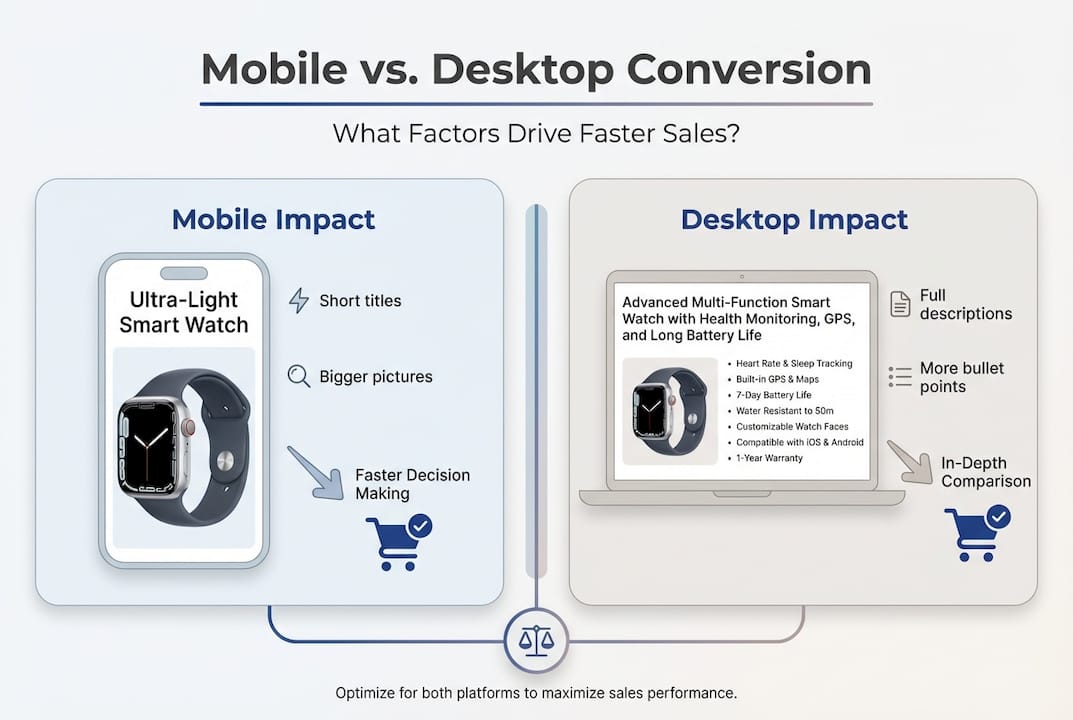
| Factor | Desktop Impact | Mobile Impact |
|---|---|---|
| Title visibility | Full 200 characters | First 80 characters |
| Image quality | Important | Critical |
| Bullet point length | Moderate concern | Major concern |
| A+ Content | Helpful | Essential |
| Load speed | Standard | Make-or-break |
The shift toward mobile isn’t slowing down. Amazon’s mobile app continues to gain users, and voice shopping through Alexa often pulls product details optimized for mobile formats. Sellers who adapt now position themselves ahead of the curve, while those who delay watch their rankings and sales erode.
Pro Tip: Check your own listings on your phone right now. If you struggle to find key information in three seconds, your customers face the same frustration.
For broader strategies on maximizing your Amazon presence, explore our selling tips and review our comprehensive optimization checklist to ensure you’re covering all critical elements.
What you need to optimize your Amazon listings for mobile
Before diving into optimization, gather the right tools and assets. You can’t improve what you can’t measure, and you can’t test effectively without the proper setup.
Start with the Amazon Seller App on both iOS and Android devices. This app shows you exactly how your listings appear to real shoppers. Desktop previews lie. They don’t account for font rendering, image cropping, or the way mobile browsers handle white space. Testing on actual phones and tablets reveals the truth.
You’ll also need access to your Brand Analytics dashboard. Monitor Brand Analytics for mobile-specific metrics like conversion rate by device type, click-through rate on mobile, and search term performance across platforms. These insights guide your optimization priorities and help you measure results.
Next, audit your existing assets:
- Product images: You need at least seven high-resolution photos showing different angles, use cases, and benefits
- Bullet points: Current text that you’ll refine for mobile readability
- A+ Content: Existing modules or plans to create visual storytelling elements
- Backend keywords: Search terms that inform your mobile title strategy
- Competitor analysis: Screenshots of top-performing mobile listings in your category
Having multiple devices matters because screen sizes vary dramatically. An iPhone SE displays content differently than a Samsung Galaxy, and tablets offer yet another experience. Testing across devices catches issues you’d otherwise miss.
Essential Tools Comparison
| Tool | Purpose | Cost | Priority |
|---|---|---|---|
| Amazon Seller App | Real-time mobile preview | Free | Critical |
| Brand Analytics | Performance tracking | Included with Brand Registry | Critical |
| Multiple test devices | Cross-platform validation | Varies | High |
| Image editing software | Photo optimization | Free to $50/month | High |
| A/B testing tools | Conversion optimization | $50-$200/month | Medium |
Pro Tip: Create a simple spreadsheet tracking your current mobile metrics before making changes. This baseline lets you quantify improvements and justify further optimization investments.
For a deeper understanding of listing fundamentals, check our detailed listing guide that covers both mobile and desktop best practices.
Step-by-step: How to optimize Amazon listings for mobile users
Now let’s walk through the specific actions that transform mediocre mobile listings into conversion machines. Follow these steps in order for maximum impact.
1. Front-load critical information in your title
Mobile screens show only the first 80 characters of your title before truncating. Place your brand name, primary keyword, and most compelling benefit in that opening window. Save secondary keywords and specifications for later in the title where desktop users will see them.
Bad example: “Premium Stainless Steel Kitchen Utensil Set with Wooden Handles, 12-Piece Collection”
Good example: “Kitchen Utensil Set, 12-Piece Stainless Steel with Heat-Resistant Wooden Handles”
The second version puts the product type and key benefit (heat-resistant) upfront where mobile users see it immediately. Learn more about crafting effective titles in our title optimization guide.
2. Use seven or more high-quality images with clear benefits
Mobile shoppers zoom in on images and swipe through galleries rapidly. Your first image must show the product clearly against a white background per Amazon requirements. Images two through seven should demonstrate use cases, highlight features, show scale, and include lifestyle shots that help buyers visualize ownership.

Each image should communicate value without requiring text. Infographics work well if the text is large and minimal. Avoid cluttered compositions that confuse rather than clarify. Our optimize images resource provides detailed specifications and examples.
3. Write concise bullets optimized for mobile readability
Mobile users rarely read full bullet points. They scan for keywords and quick value propositions. Keep each bullet under 150 characters when possible. Start with the benefit, then support it with a brief feature explanation.
Structure bullets like this:
- Benefit-driven opening: Feature that delivers it
- Benefit-driven opening: Feature that delivers it
This format lets mobile users grasp value instantly without wading through dense text. Break complex products into simple, scannable advantages.
4. Implement A+ Content for visual engagement
A+ Content boosts conversion rates 5-10%, especially on mobile where visual storytelling replaces lengthy descriptions. Use comparison charts, lifestyle images, and benefit callouts that load quickly and display cleanly on small screens.
Focus on modules that work well on mobile: image and text overlays, comparison tables with large fonts, and single-column layouts. Avoid complex multi-column designs that break on phones.
5. Test on multiple devices and iterate
Open your listing on at least three different phones and one tablet. Check for image clarity, text readability, button placement, and overall flow. Ask friends or family to navigate your listing and note where they hesitate or get confused.
A/B test titles and images using Amazon’s built-in experiments feature. Run tests for at least two weeks to gather statistically significant data. Small changes like reordering images or tweaking the first bullet can yield surprising conversion lifts.
Pro Tip: Screenshot your listing on each device and compare them side by side. This visual audit often reveals inconsistencies you’d miss by checking devices separately.
For comprehensive search optimization strategies that complement mobile improvements, visit our Amazon search optimization guide.
Common mistakes to avoid in Amazon mobile optimization
Even experienced sellers stumble into mobile optimization traps that sabotage their conversion rates. Recognizing these pitfalls helps you sidestep costly errors.
Keyword stuffing that truncates on mobile
Cramming every possible keyword into your title creates an unreadable mess on phones. Mobile users see a wall of text that communicates nothing. Prioritize readability over keyword density in the visible portion of your title. You can still include secondary keywords after the 80-character mark for desktop and search indexing.
Relying on text within images
Small text embedded in product photos becomes illegible on mobile screens. Shoppers zoom in, but if your image resolution isn’t perfect, that text turns into blurry pixels. Always place critical information in actual text fields where Amazon’s mobile app can render it properly.
Writing overly long paragraphs
Bullet points that run five or six lines on mobile feel overwhelming. Shoppers skip them entirely. Break information into digestible chunks. Use line breaks strategically. Make every word earn its place.
Ignoring Brand Analytics mobile data
Monitor Brand Analytics for mobile-specific metrics rather than looking at aggregate numbers. Your desktop conversion rate might look healthy while mobile tanks. Segment your data to identify where problems actually exist.
Neglecting load speed optimization
Heavy images slow down mobile page loads, especially on cellular connections. Compress images without sacrificing quality. Amazon’s systems handle some optimization automatically, but starting with properly sized files prevents delays.
“The biggest mistake sellers make is designing for the screen in front of them instead of the device in their customer’s hand. Mobile isn’t a smaller desktop. It’s a completely different buying experience.” — Amazon Optimization Specialist
For real-world examples of listings that get mobile right, browse our collection of Amazon mobile listing examples across various categories.
How to track, test, and verify mobile listing performance
Optimization without measurement is guesswork. Establish clear metrics and tracking systems to validate your mobile improvements and guide ongoing refinements.
Start by identifying your baseline mobile conversion rate in Seller Central. Navigate to Business Reports, filter by device type, and note your current mobile performance. This number becomes your benchmark for measuring progress.
Key Mobile Metrics to Monitor
| Metric | What It Reveals | Target Improvement |
|---|---|---|
| Mobile conversion rate | Purchase completion on phones | 10-20% lift |
| Mobile click-through rate | Title and image effectiveness | 15-25% lift |
| Add-to-cart rate (mobile) | Interest level before purchase | 10-15% lift |
| Mobile bounce rate | Immediate exits from listing | 20-30% reduction |
Monitor Brand Analytics for mobile-specific metrics and set up weekly reviews of your performance data. Look for patterns like certain images driving higher engagement or specific bullet points correlating with add-to-cart actions.
Implement a testing schedule:
- Week 1-2: Test title variations focusing on the first 80 characters
- Week 3-4: A/B test primary image options
- Week 5-6: Experiment with bullet point order and length
- Week 7-8: Try different A+ Content layouts
- Week 9+: Revisit winning elements and test incremental improvements
Document every change and its impact. Small optimizations compound over time. A 2% conversion lift here and a 3% lift there add up to significant revenue growth across months.
Pro Tip: Set calendar reminders to review your mobile metrics monthly. Markets shift, competitors adapt, and seasonal trends emerge. Regular check-ins keep your listings performing at peak levels.
When you’re ready to scale your optimization efforts across your entire catalog, our inventory listing optimization strategies help you systematize improvements efficiently.
Get expert help to optimize your Amazon listings for mobile
You’ve learned the fundamentals of mobile optimization, but implementing these strategies across multiple products while managing your business can feel overwhelming. That’s where specialized support makes the difference between incremental improvements and transformative results.
Searchoneers provides mobile-focused optimization tools designed specifically for Amazon sellers who want to maximize their mobile conversion rates without spending hours testing and tweaking. Our data-backed approach identifies the highest-impact changes for your specific products and category.

Our listing enhancement guide walks you through advanced techniques that build on the foundations covered here. You’ll discover how to layer optimization strategies for compounding effects that competitors can’t easily replicate.
We’ve also developed a proven optimization workflow that streamlines the entire process. Instead of guessing which changes to prioritize, you’ll follow a systematic approach that delivers measurable results in weeks, not months.
For sellers managing large catalogs, our optimize inventory listings methodology helps you scale improvements across hundreds or thousands of products without sacrificing quality or consistency.
Mobile optimization isn’t a one-time project. It’s an ongoing competitive advantage that separates thriving sellers from those watching their market share erode. With the right support and tools, you can stay ahead of mobile trends and capture the growing wave of smartphone shoppers driving Amazon’s future.
Frequently asked questions
What is the biggest difference between desktop and mobile Amazon listings?
Mobile users see less content at once, so titles, images, and the first bullet points have outsized impact on sales conversion. Mobile optimization can lift sales 10-20% by addressing these visibility constraints.
How often should I test and update my listings for mobile?
You should review analytics and A/B test new images or titles at least quarterly to keep listings optimized for changing mobile behavior. Test listings on actual mobile devices and monitor Brand Analytics for mobile-specific metrics regularly.
Which Amazon metrics matter most on mobile?
Look at mobile conversion rate, click-through rate, add-to-cart rate, and visibility in Brand Analytics. These metrics reveal how effectively your listing converts smartphone shoppers specifically.
Does A+ Content really increase sales for mobile shoppers?
A+ Content boosts conversion rates 5-10%, especially for mobile users who rely on visuals and succinct information. The visual storytelling format works perfectly for small screens where text-heavy descriptions fail.
How long does it take to see results from mobile optimization?
Most sellers notice measurable improvements within two to four weeks after implementing mobile-focused changes. Conversion rate increases typically appear first, followed by ranking improvements as Amazon’s algorithm recognizes better engagement metrics.

Comments
One response to “Optimize Amazon for Mobile: Boost Visibility and Sales Fast”
[…] mobile-specific image tips, see our guide on Amazon mobile listing optimization. If you’re brand-registered, Amazon Enhanced Brand Content opens up additional visual […]