

TL;DR:
- Sponsored Products account for 70-80% of ad spend and deliver up to five times higher conversions than Sponsored Brands. Success depends on optimizing listings, strategic bidding, and layered targeting, including negative keywords, to maximize return on investment. Using all ad formats and maintaining continuous listing and campaign optimization creates a competitive advantage on Amazon.
Amazon Sponsored Products command 70-80% of ad spend and deliver up to 5x higher conversions compared to Sponsored Brands, yet a surprising number of sellers treat them like a simple “set it and forget it” tool. They guess at bids, skip negative targeting, and wonder why their ACoS (Advertising Cost of Sale) keeps climbing. The truth is, Sponsored Products are the most powerful paid format on Amazon, and understanding how they actually work gives you a real edge over competitors who are flying blind.
Table of Contents
- How Amazon Sponsored Products work
- Sponsored Products vs Sponsored Brands and Sponsored Display
- Targeting strategies: Automatic, manual, and negative targeting
- Advanced Sponsored Products tactics: Optimizing for performance
- Why mastering Sponsored Products is just the start
- Optimize your Amazon ads for maximum results
- Frequently asked questions
Key Takeaways
| Point | Details |
|---|---|
| Sponsored Products basics | Sponsored Products are pay-per-click ads that boost product visibility on Amazon search and product pages. |
| Targeting strategies matter | Harness automatic, manual, and negative targeting to maximize ROI and drive more conversions. |
| Listing optimization is crucial | Ad eligibility and performance depend on keyword-rich, well-structured product listings. |
| Advanced tactics pay off | Weekly data harvesting, dynamic bidding, and expert negation practices can dramatically reduce ACoS and wasted spend. |
| Brands and Display boost reach | Combining Sponsored Products with other ad formats expands awareness and drives digital halo effects. |
How Amazon Sponsored Products work
At their core, Sponsored Products are cost-per-click (CPC) ads that promote individual product listings. You only pay when a shopper clicks your ad. There are no upfront fees, no minimum commitments, and no guaranteed impressions. Your ad competes in an auction every time a relevant search happens, and the winner gets the placement.
Here is what makes Sponsored Products unique compared to other digital advertising:
- Placement variety: Ads appear in search results (top, middle, and rest of search), on product detail pages, and in select off-Amazon placements through Amazon’s extended network.
- Seller-controlled bidding: You set your own bids and daily budgets. Amazon does not decide how much you spend.
- Eligibility requirements: Only in-stock, buybox-eligible products with complete listing fields can run Sponsored Products ads. A poorly optimized listing can make your product ineligible entirely.
- Dynamic bidding options: Amazon offers three bidding strategies: down only (reduces bids when a click is less likely to convert), up/down (raises bids up to 100% for top placements), and fixed (your bid stays constant regardless of placement).
“Your ad is only as strong as the listing behind it. Incomplete titles, missing bullet points, or thin descriptions don’t just hurt organic rank, they can disqualify your product from running ads altogether.”
Understanding placement is critical. Top-of-search placements typically cost more per click but generate higher conversion rates (CVR). Rest-of-search and product page placements cost less but attract shoppers who are still browsing. Knowing this helps you allocate budget where it counts most.
| Placement type | Typical CPC | Conversion rate | Best use case |
|---|---|---|---|
| Top of search | High | Highest | Launch, competitive keywords |
| Rest of search | Medium | Medium | Mid-funnel keywords |
| Product pages | Low to medium | Variable | Conquest, cross-sell |
| Off-Amazon | Low | Lower | Retargeting, awareness |
The foundation of a successful Sponsored Products campaign starts with optimizing inventory listings before you spend a single dollar on ads. When your listing fields are complete and keyword-rich, your ads become more relevant, your bids go further, and your Quality Score improves. Think of your listing as the engine and your ad as the fuel. Bad engine, wasted fuel. You can also explore Sponsored Products essentials to build a solid campaign foundation from day one.
For sellers who want to go deeper on optimizing product pages, strong page content directly impacts both organic and paid performance.
With the foundation laid, let’s explore the different Sponsored ad formats and how they compare.
Sponsored Products vs Sponsored Brands and Sponsored Display
Not all Amazon ad formats serve the same purpose. Choosing the wrong format for your goal is one of the most common and costly mistakes sellers make. Here is how the three main formats break down:
| Ad format | Funnel stage | Format type | Targeting style | Key goal |
|---|---|---|---|---|
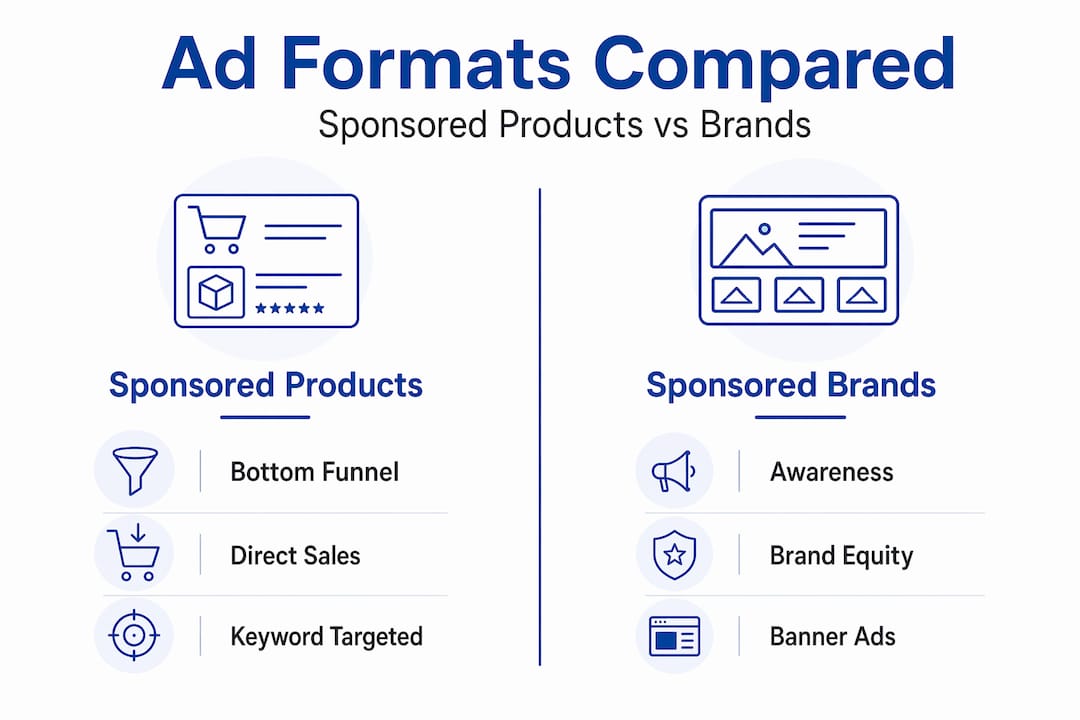
| Sponsored Products | Bottom funnel | Single product listing | Keywords and products | Direct sales |
| Sponsored Brands | Top funnel | Banner with logo and headline | Keywords and categories | Brand awareness |
| Sponsored Display | Mid to top funnel | Display ad on and off Amazon | Audiences and products | Retargeting, awareness |
Sponsored Products vs others shows a clear pattern: Sponsored Products command 70-80% of ad spend and achieve 2-5x higher conversion rates than Sponsored Brands. Why? Because they meet shoppers at the moment of intent. A shopper searching “stainless steel water bottle 32oz” is ready to buy. Your Sponsored Product ad drops directly into that search, matching intent with offer.
Here is when to use each format:
- Use Sponsored Products when your primary goal is immediate sales. They work for new product launches, competitive keyword targeting, and capturing shoppers with high purchase intent.
- Use Sponsored Brands when you want to build brand recognition, promote a product line, or appear above search results with a custom headline. Sponsored Brands require Brand Registry enrollment.
- Use Sponsored Display when you want to retarget shoppers who viewed your product but did not buy, or when you want to reach audiences based on their browsing behavior both on and off Amazon.
The smartest sellers do not pick just one format. They layer all three strategically. Sponsored Products drive the bulk of conversions, Sponsored Brands build the brand halo, and Sponsored Display recaptures lost shoppers. You can review a full Sponsored Listings overview to see how these formats work together in a cohesive strategy.
For brands investing in video content, exploring video ad formats can add a powerful creative layer to your Sponsored Brands and Sponsored Products campaigns.
Now that you know the types, let’s dive into the crucial targeting strategies that unlock Sponsored Products’ power.
Targeting strategies: Automatic, manual, and negative targeting
Targeting is where most sellers either win big or waste their entire budget. Sponsored Products offer three targeting modes, and knowing when and how to use each one is the difference between a 15% ACoS and a 60% ACoS.
Automatic targeting lets Amazon match your ad to relevant keywords and products based on your listing content. It is ideal for discovery. When you launch a new product, auto campaigns reveal which search terms actually convert. You are essentially paying Amazon to do keyword research for you.
Manual targeting gives you full control. You choose specific keywords or products to target, and you select match types:
- Exact match: Your ad only shows for the precise keyword you enter. High precision, lower volume.
- Phrase match: Your ad shows for searches containing your keyword phrase. Balanced reach and relevance.
- Broad match: Your ad shows for searches loosely related to your keyword. High volume, but requires strong negative targeting to avoid waste.
Product targeting lets you place ads on specific competitor or complementary product pages. This is powerful for conquest campaigns (targeting competitor listings) and cross-sell opportunities.
Negative targeting is the unsung hero of Sponsored Products. Layered targeting strategies using automatic campaigns for discovery, manual campaigns for precision, and robust negatives are considered best practice. The workflow is simple: run auto campaigns, harvest high-performing search terms weekly, move them to manual exact match campaigns, and add low-performing terms as negatives in your auto campaign.
Common mistakes that drain budgets:
- Over-relying on broad match without negatives
- Never reviewing auto campaign search term reports
- Failing to add negative exact matches for irrelevant terms
- Targeting too many keywords in a single ad group, diluting relevance
Pro Tip: Use Amazon keyword strategies to build a tiered keyword list before launching. Organize keywords by match type, intent level, and estimated search volume so your campaigns start with structure instead of chaos.
Strong keyword research also pays dividends beyond ads. Check out keyword research tips and SEO keyword impact to understand how the same keywords that drive paid traffic also fuel organic ranking. For sellers who want a structured process, the listing optimization workflow shows exactly how to align listing content with your targeting strategy.
After grasping targeting strategies, let’s address the advanced tactics that separate top advertisers from basic users.
Advanced Sponsored Products tactics: Optimizing for performance
Once you have the basics running, these advanced tactics push your campaigns from average to exceptional.
Bid 20-30% above suggested bids at launch. New campaigns lack sales history and relevance signals. Bidding aggressively early helps you win impressions, gather data, and build conversion history faster. Once you have data, scale bids back to efficient levels.
Pause zero-sales keywords after 7 days. Do not let underperformers drain your budget. If a keyword has spent enough to generate at least one sale (based on your product’s conversion rate) and has produced nothing, pause it. This is not failure, it is discipline.
Negate high-spend, zero-sales terms in auto campaigns. After running auto campaigns for two to three weeks, pull the search term report. Any term that has spent more than your target cost-per-acquisition (CPA) without a sale gets added as a negative exact match.
Use placement bid adjustments for top-of-search. In your campaign settings, you can increase bids specifically for top-of-search placement by a percentage multiplier. If your product converts well at the top, this is a high-ROI lever.
Harvest search terms weekly. Weekly harvesting of auto search terms for manual campaigns lowers ACoS by up to 40%. This is not optional for serious sellers. It is the single most impactful ongoing optimization habit you can build.
Optimize listing fields for ad eligibility. Your ads are ineligible if keywords are missing from listing fields like the title, bullet points, backend search terms, and description. Every field matters.
“The sellers who consistently outperform are not the ones with the biggest budgets. They are the ones who review their search term reports every single week and act on what they find.”
Pro Tip: Use the optimization checklist to audit your listing fields before launching any new campaign. A complete, keyword-rich listing is the prerequisite for ad eligibility and relevance.
For sellers managing multiple campaigns, reviewing an automation checklist can help you build repeatable systems so optimization happens consistently, not just when you remember. And if you want to see what high-performance listings look like in practice, the high-converting listings guide is worth bookmarking.

With advanced tactics covered, we offer a unique expert perspective that reframes common approaches to Sponsored Products.
Why mastering Sponsored Products is just the start
Here is the perspective most guides skip: Sponsored Products are essential, but treating them as your only Amazon advertising tool is a strategic blind spot.
Most sellers pour 90% of their ad budget into Sponsored Products and ignore Sponsored Brands and Sponsored Display entirely. The logic makes sense on the surface. Sponsored Products convert better and drive direct sales. Why spend on anything else?
The answer is the halo effect. When shoppers see your Sponsored Brand banner at the top of search and then encounter your Sponsored Product listing below it, brand recognition compounds. Branded search lift, the increase in shoppers searching specifically for your brand name after exposure to your ads, is a measurable and often overlooked benefit. Ignoring Brands and Display means missing these halo effects, including branded search lift and conquest opportunities.
There is another layer. Your listing quality affects every ad format you run. Weak titles, thin bullet points, and missing backend keywords do not just hurt your organic rank. They reduce your ad relevance score, which means you pay more per click and win fewer auctions. Listing optimization is not a one-time task. It is ongoing, and it directly feeds your paid performance.
The sellers who dominate their categories are not running the most ads. They are running the most relevant ads, backed by the most optimized listings. Check out optimized listings examples to see what this looks like in practice across different product categories.
The takeaway: Sponsored Products are your conversion engine, but Sponsored Brands build the brand equity that makes shoppers choose you over a cheaper competitor. Use both. Optimize everything.
Optimize your Amazon ads for maximum results
Your Sponsored Products strategy is only as strong as the foundation beneath it. Strong listings, precise keywords, and a structured optimization workflow are what separate sellers who scale from sellers who stall.

At Searchoneers, we specialize in exactly this. Our listing enhancement guide walks you through every listing field that impacts both ad eligibility and organic rank. The listing optimization workflow gives you a repeatable system for keeping your listings competitive as the marketplace evolves. And if you are building your paid strategy from the ground up, start with Amazon SEO basics to align your organic and paid efforts for maximum visibility. Your next sales breakthrough starts with the right foundation.
Frequently asked questions
What makes a product eligible for Sponsored Products ads?
Only in-stock products with complete listing fields, including title, bullet points, description, and backend search terms, qualify for Sponsored Products. Ads become ineligible when keywords are missing from these critical listing fields.
What targeting options do Sponsored Products offer?
Sponsored Products provide automatic, manual, and negative targeting. Targeting options include automatic (Amazon matches keywords and products), manual (exact, phrase, and broad match keyword targeting plus product targeting), and negative targeting to exclude irrelevant terms and products.
How does bidding work for Sponsored Products?
You set your own bids, which determine auction wins based on competitiveness and relevance. Dynamic bidding options include down only, up/down (up to 100% increase for high-conversion placements), and fixed bids, and you only pay when a shopper clicks your ad.
What is the difference between Sponsored Products and Sponsored Brands?
Sponsored Products target bottom-funnel shoppers with a single product listing via keyword-driven auctions, while Sponsored Brands build top-funnel brand awareness using a banner with your logo, a custom headline, and multiple products, and they require Brand Registry enrollment.
How can I reduce wasted ad spend in Sponsored Products campaigns?
The most effective approach is combining robust negative targeting with a weekly workflow of migrating high-performing auto search terms to manual exact match campaigns, and promptly pausing any keyword that has spent beyond your target CPA without generating a sale.

Comments
One response to “Amazon Sponsored Products explained: Boost sales and visibility”
[…] how to boost sales with Sponsored Products by pairing these ad formats with a well-optimized […]