

TL;DR:
- Most sellers treat Amazon automatic delivery as a set-and-forget solution, risking stockouts or overstocking.
- Effective utilization requires regular threshold adjustments based on sales trends, lead times, and SKU behaviors.
Running out of stock is one of the fastest ways to tank your Amazon ranking, lose the Buy Box, and hand sales directly to your competitors. For sellers managing multiple SKUs across fluctuating demand cycles, the fear of an empty shelf is constant. Amazon’s automatic delivery systems, specifically FBA auto-replenishment through Amazon Warehousing and Distribution (AWD) and the Subscribe & Save program, are built to eliminate exactly that anxiety. This guide breaks down how both systems work, how to configure them correctly, and how to turn them into a genuine competitive advantage for your store.
Table of Contents
- Understanding Amazon automatic delivery: Key concepts
- How FBA auto-replenishment works for sellers
- Subscribe & Save: Turning recurring demand into scheduled deliveries
- Best practices to optimize automatic delivery for efficiency and satisfaction
- Why most Amazon sellers misunderstand automatic delivery and how to actually win
- Take your Amazon automatic delivery strategy to the next level
- Frequently asked questions
Key Takeaways
| Point | Details |
|---|---|
| Automate FBA stock replenishment | Use AWD auto-replenishment with thresholds to prevent inventory shortfalls and maintain consistent FBA stock. |
| Leverage Subscribe & Save | Enable recurring customer deliveries and predictable orders for eligible products to boost loyalty and sales. |
| Set smart threshold values | Align stock thresholds with sales velocity and lead time to avoid over- or understocking. |
| Monitor account health | Maintain over 90% in-stock rate and strong fulfillment history to qualify for automatic delivery programs. |
| Adjust automation regularly | Review and fine-tune automatic delivery settings each month to maximize efficiency and customer satisfaction. |
Understanding Amazon automatic delivery: Key concepts
Amazon automatic delivery is not a single feature. It is a collection of interconnected systems that manage both your inventory replenishment and your customers’ recurring purchase schedules. Understanding the difference between these systems is the first step to using them effectively.
At the seller level, FBA auto-replenishment is powered by AWD. This service monitors your FBA inventory and, when stock drops below a threshold you define, automatically creates replenishment shipments based on seller-set minimum and maximum FBA inventory thresholds. Think of it as a silent warehouse manager who never sleeps and never forgets to reorder.
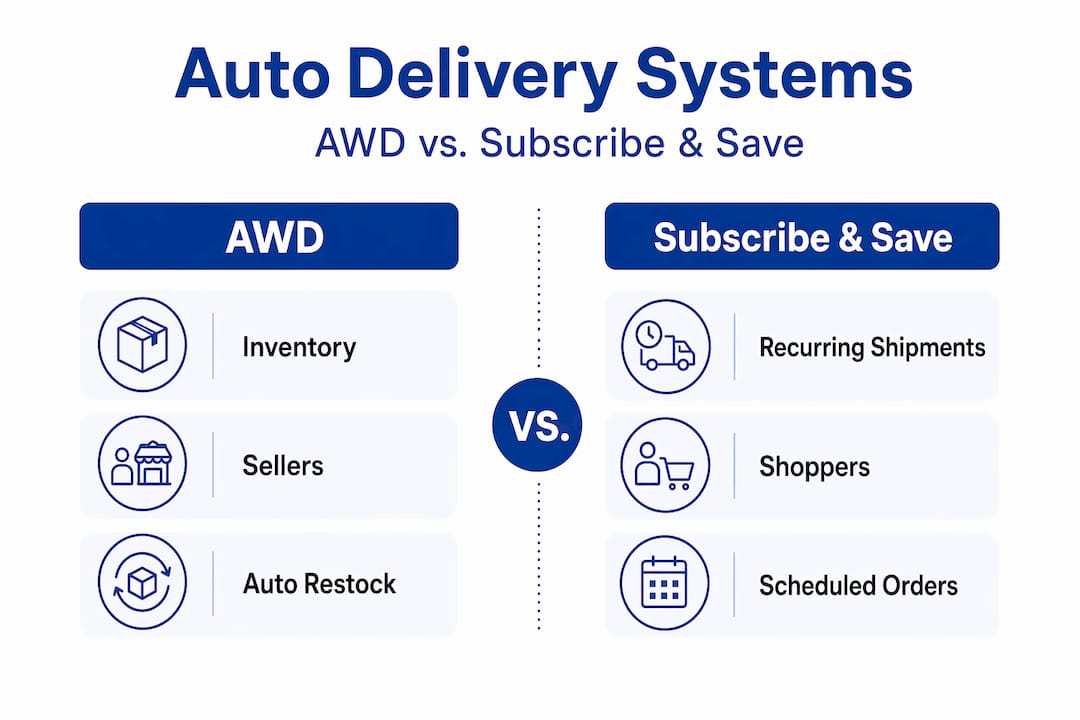
At the customer level, Subscribe & Save is Amazon’s mechanism for customers to receive recurring deliveries. When a shopper subscribes to your product, Amazon schedules and processes their orders automatically at whatever interval they choose, whether monthly, every two months, or beyond. As a seller, this translates into predictable, recurring revenue without any additional marketing spend.
Here is a quick comparison of the two systems:
| Feature | FBA auto-replenishment (AWD) | Subscribe & Save |
|---|---|---|
| Who it serves | Sellers (inventory management) | Customers (recurring purchases) |
| What it automates | Shipments from AWD to FBA | Customer order scheduling |
| Configuration | Seller-set or Amazon-recommended | Enrollment and discount settings |
| Key requirement | Active AWD enrollment | Brand Registry, 90%+ in-stock rate |
| Primary benefit | Prevents stockouts | Generates recurring revenue |
Why should you care about both? Because they work together. A well-stocked FBA inventory, maintained automatically through AWD replenishment, ensures that when Subscribe & Save orders roll in, you can fulfill them without disruption. Stockouts on subscribed products trigger cancellations and damage your fulfillment metrics, which can cost you eligibility for the program entirely.
Key benefits of using Amazon’s automatic delivery systems include:
- Reduced manual oversight of inventory levels across multiple SKUs
- Improved customer trust through consistent, on-time delivery
- Higher lifetime customer value via recurring subscription revenue
- Better account health scores tied to fulfillment consistency
- Lower risk of losing the Buy Box due to inventory gaps
Understanding Shopify automation basics can also provide useful context if you sell across multiple channels, since the logic of threshold-based replenishment applies broadly to e-commerce operations.
“Automatic delivery isn’t just a convenience feature. For high-velocity sellers, it is the operational backbone that separates scalable businesses from those stuck in constant firefighting mode.”
How FBA auto-replenishment works for sellers
With the basics defined, we dive into how AWD auto-replenishment keeps your FBA inventory optimized. The mechanics here matter a lot, because a misconfigured setup can cause just as many problems as having no automation at all.
AWD auto-replenishment offers three distinct configuration modes. According to Amazon’s official guidance, you can:
- Turn it off entirely, meaning you manage all replenishment manually.
- Use quantity limits, where you set specific minimum and maximum unit counts in FBA and Amazon triggers shipments when stock falls below your minimum.
- Use Amazon-recommended quantities, where Amazon determines the replenishment quantity and creates shipments on your behalf based on its own demand forecasting.
Each option has a different risk profile. Manual management gives you full control but demands constant attention. Quantity limits give you a safety net while keeping you in the driver’s seat. Amazon-recommended quantities are the most hands-off but require trust in Amazon’s forecasting accuracy, which can vary significantly by product category and seasonality.
Here is a practical comparison of the three modes:
| Mode | Control level | Best for | Risk |
|---|---|---|---|
| Off | Full | Experienced sellers with dedicated ops teams | High if understaffed |
| Quantity limits (min/max) | High | Most active sellers | Low with correct thresholds |
| Amazon-recommended | Low | New sellers or low-complexity catalogs | Over/understocking possible |
One of the most important operational details to understand is the multi-SKU edge case. If you have multiple seller SKUs mapped to the same ASIN, Amazon uses the highest threshold value set across all SKUs to determine replenishment quantity. This means if one SKU has a maximum of 500 units and another has 200, Amazon will replenish to 500. For sellers who have not audited their SKU configurations recently, this can silently drive overstock and inflate storage fees.
Configuration changes also have a timing nuance worth noting. When you update your thresholds, Amazon considers both on-hand FBA inventory and in-transit inventory when calculating whether a replenishment shipment is needed. This means if you just sent a large shipment that has not arrived yet, Amazon may not trigger another replenishment even if your on-hand count looks low. Always factor in lead times when setting your thresholds.
Pro Tip: Set your minimum threshold at your average weekly sales velocity multiplied by your supplier lead time, plus a 20% safety buffer. For example, if you sell 100 units per week and your supplier takes three weeks to deliver, set your minimum at 360 units (300 plus 20%). This prevents stockouts even when lead times stretch unexpectedly.
Pairing smart threshold configuration with solid inventory optimization strategies is how top sellers stay consistently in stock without tying up unnecessary capital in excess inventory. You can also explore FBA listing optimization tips to ensure your listings are conversion-ready when your inventory is fully stocked.
AI-driven approaches in eCommerce are also reshaping how sellers forecast demand, and integrating those insights with your AWD threshold settings can give you a meaningful edge over sellers relying on guesswork.
Subscribe & Save: Turning recurring demand into scheduled deliveries
Automatic inventory isn’t the only advantage. Scheduled customer deliveries are equally powerful, and Subscribe & Save is the engine that makes them possible.

When a customer subscribes to your product, Amazon converts their one-time purchase intent into a recurring delivery schedule. From your perspective as a seller, this means predictable order volume, reduced dependence on paid advertising for repeat purchases, and a built-in retention mechanism that keeps customers coming back without any extra effort on your part.
Subscribe & Save eligibility depends on several seller and offer characteristics. To qualify, you generally need to meet the following criteria:
- Amazon Brand Registry enrollment is required for most sellers
- Strong fulfillment history, meaning a consistent track record of on-time, accurate shipments
- In-stock rate above 90% across your enrolled ASINs
- Account in good standing, with no recent policy violations or performance warnings
- Competitive pricing, since Amazon monitors whether your Subscribe & Save price remains reasonable relative to market rates
Once you are enrolled, eligible products can be automatically enrolled in the program. FBA sellers typically receive default enrollment for qualifying products, along with the option to set a discount for subscribers. The standard discount is 5%, and offering 10% or more can significantly boost subscription conversion rates.
Here is why the in-stock requirement matters so much. If a subscribed product goes out of stock when an order is due, Amazon either delays the shipment or cancels the subscription entirely. Repeated stockouts on subscribed products can trigger automatic removal from the program. This is exactly why AWD auto-replenishment and Subscribe & Save are best used together.
Pro Tip: Monitor your Subscribe & Save dashboard weekly, not monthly. Subscription cancellation rates spike after fulfillment failures, and catching a dip early gives you time to correct inventory issues before they compound into eligibility problems.
Sellers who combine strong listing eligibility practices with Subscribe & Save enrollment often see subscription rates climb because their listings clearly communicate product value and consistency. Understanding vendor status and optimization can also help you evaluate whether a vendor or seller model better supports your recurring delivery goals.
The recurring revenue potential here is significant. A customer who subscribes to a consumable product, think supplements, pet food, or household essentials, can generate 6 to 12 orders per year from a single acquisition. That changes your customer acquisition cost math dramatically in your favor.
Best practices to optimize automatic delivery for efficiency and satisfaction
Understanding mechanisms is critical, but optimal results depend on the seller’s strategic setup. Automation is only as good as the parameters you feed it.
The most common mistake sellers make is setting thresholds once and never revisiting them. Your sales velocity in January looks nothing like your velocity in November. If your thresholds are calibrated to slow-season data, you will run out of stock during peak periods. If they are calibrated to peak data, you will overstock during slow months and pay unnecessary storage fees.
Here are the core best practices for optimizing your automatic delivery configuration:
- Sync thresholds with rolling sales velocity. Use a 30 to 90 day rolling average rather than a fixed historical number. This keeps your replenishment logic responsive to real demand trends.
- Account for supplier lead times in your minimum threshold. If your supplier takes four weeks to ship, your minimum should cover at least four weeks of sales plus a safety buffer.
- Audit multi-SKU ASINs quarterly. The highest-threshold rule means one misconfigured SKU can drive replenishment for the entire ASIN. Regular audits catch these issues before they inflate your storage costs.
- Monitor in-transit inventory before adjusting thresholds. Making threshold changes while a large shipment is in transit can result in double-ordering. Always check your in-transit count first.
- Track Subscribe & Save cancellation rates by ASIN. A spike in cancellations on a specific product is almost always a signal of a fulfillment or stock issue, not a pricing problem.
- Review account health metrics monthly. Late shipment rates, cancellation rates, and order defect rates all affect your Subscribe & Save eligibility. Staying on top of these metrics protects your program access.
Because AWD auto-replenishment decisions can be driven by seller-set thresholds or Amazon-recommended quantities, the optimal strategy for customer satisfaction requires aligning thresholds with your sell-through, lead times, and storage cost tolerance. Otherwise, edge cases like the multi-SKU highest-threshold behavior can amplify over or under-replenishment in ways that are hard to reverse quickly.
Pro Tip: Build a simple spreadsheet that tracks your minimum threshold, current on-hand inventory, in-transit inventory, and 30-day sales velocity for each SKU. Review it weekly. This five-minute habit prevents the majority of replenishment errors that cost sellers thousands in lost sales and excess storage fees.
Explore warehouse optimization strategies to go deeper on structuring your fulfillment operations, and check out Amazon seller success strategies for broader tactical guidance. Investing in product page optimization alongside your delivery setup ensures that when customers land on your listing, they convert and subscribe.
Why most Amazon sellers misunderstand automatic delivery and how to actually win
Here is the uncomfortable truth: most sellers treat automatic delivery as a set-and-forget solution. They configure AWD thresholds once, enroll in Subscribe & Save, and assume the systems will handle everything. That assumption is where things go wrong.
Automation is a framework, not a guarantee. The systems Amazon provides are powerful, but they operate on the data and parameters you give them. If your thresholds are misaligned with your actual sales velocity, the automation faithfully executes the wrong strategy at scale. You end up with either a warehouse full of slow-moving inventory or a string of stockouts during your highest-demand periods.
The sellers who genuinely win with automatic delivery are not the ones who configure it and walk away. They are the ones who treat their threshold settings as a living document, revisiting them monthly and adjusting for demand spikes, supplier delays, and seasonal shifts. They also pay close attention to the SKU-level edge cases that most sellers never bother to investigate.
The multi-SKU highest-threshold behavior is a perfect example. Most sellers do not even know it exists until they notice their storage fees climbing unexpectedly. By then, they have been overstocking for months. A single quarterly audit of your SKU configurations would have caught it immediately.
The other thing most sellers miss is the relationship between Subscribe & Save eligibility and account health. They focus on enrollment and discount settings but ignore the underlying metrics that determine whether they stay eligible. An in-stock rate that dips below 90% even briefly can trigger automatic removal from the program, wiping out recurring revenue that took months to build.
The winning approach is to use management-driven optimization alongside your automation tools. Automation handles the execution. You handle the strategy. That combination is what separates scalable Amazon businesses from those that plateau.
Take your Amazon automatic delivery strategy to the next level
You now have a clear picture of how Amazon’s automatic delivery systems work and, more importantly, how to configure them for real results. The next step is putting that knowledge into action with the right tools and workflows behind you.

At Searchoneers, we help Amazon sellers build the kind of listing and inventory infrastructure that makes automation actually work. From threshold strategy to listing optimization, our resources are designed to close the gap between understanding and execution. Start with our listing enhancement guide to make sure your product pages are ready to convert the traffic your stocked inventory attracts. Then explore our listing optimization workflow to build a repeatable system for sustained growth. For inventory-specific strategies, our inventory listing optimization resource ties it all together.
Frequently asked questions
How does AWD auto-replenishment keep FBA inventory in stock?
AWD automatically creates replenishment shipments when stock falls below seller-set minimum thresholds, factoring in both on-hand and in-transit inventory to avoid unnecessary double-ordering.
Can sellers use Subscribe & Save with both FBA and Fulfilled by Merchant?
Yes, Subscribe & Save is available to sellers using either FBA or Fulfilled by Merchant, as long as their account is in good standing and meets fulfillment performance requirements.
What happens if an ASIN has multiple SKUs with different thresholds set?
Amazon applies the highest threshold value across all SKUs for that ASIN, which can lead to unintended overstocking if individual SKU thresholds are not carefully aligned.
What is the minimum in-stock rate to qualify for Subscribe & Save?
Sellers need an in-stock rate above 90% to qualify, making consistent inventory management a prerequisite for maintaining program eligibility.
Should I use seller-set thresholds or Amazon-recommended quantities for replenishment?
Seller-set thresholds aligned with your actual sell-through and lead times typically outperform Amazon’s recommendations, especially for products with seasonal demand or variable supplier lead times.

Leave a Reply